
Mastering the Art of Logo Conversion: PES Embroidery File Made Simple
Introduction
You've invested time and creativity into building a perfect logo that represents your brand. It looks sharp on your website, clean on your business cards, and professional in your email signature. But when you try to stitch it onto a company polo or cap, something goes wrong. The edges blur, the fabric puckers, and what should be a professional representation of your brand looks amateurish. The solution lies in mastering one crucial process: learning how to Convert Logo To PES Embroidery File correctly.
This conversion is more art than science, but that doesn't mean it has to be complicated. Think of it as translating a book into another language. A word-for-word translation often fails to capture the true meaning and nuance. Similarly, a simple file conversion misses the mark. A proper translation requires a skilled translator who understands both languages and the cultural context. This guide will help you become that skilled translator for your logo, turning your digital design into a beautiful, physical reality.
Understanding the Translation Challenge
The first step in mastering logo conversion is understanding why you can't simply load your JPEG or PNG file directly into your embroidery machine. The two file types speak completely different languages.
Your digital logo is a raster image. It's made of pixels—tiny squares of color that create a picture when viewed together. This format works perfectly for screens and printers, but it gives an embroidery machine no useful information. The machine doesn't care what color a specific pixel is; it needs to know where to move the needle and what type of stitch to make.
A PES file, on the other hand, is a set of instructions. It's a detailed recipe that tells the embroidery machine:
-
The exact path the needle must take
-
What type of stitch to use in each section
-
The sequence to follow for efficient stitching
-
When to change thread colors
-
How to handle transitions between shapes
Recognizing this fundamental difference is the first step toward mastering the conversion process. You're not just changing a file extension; you're re-engineering your two-dimensional logo for the three-dimensional world of thread and fabric.
Preparation: Setting the Stage for Success
Before you even open your digitizing software, proper preparation of your logo will determine your success. A clean, well-prepared source file makes the conversion process smoother and produces better results.
Start with the highest quality version of your logo you can find. Vector files (AI, EPS, or SVG) are ideal because they use mathematical paths instead of pixels, allowing for perfect scaling without quality loss. If you only have a raster file (JPEG or PNG), make sure it's high-resolution with crisp, clear edges.
Simplify your design for embroidery. Look at your logo and identify elements that might not translate well to stitching:
-
Remove extremely fine lines that would be thinner than 1-2 millimeters when stitched
-
Eliminate subtle color gradients that can't be replicated with solid thread
-
Increase the spacing between small text elements
-
Consider simplifying complex background elements
This preparation work is like proofreading a document before translation—it ensures the final result maintains the core message while working within the medium's constraints.
The Three Pillars of Professional Logo Conversion
Mastering logo conversion comes down to three essential elements that work together to create professional-looking embroidery.
1. Strategic Stitch Selection
Your choice of stitch type transforms how your logo looks and feels. Think of stitch types as different tools in your toolbox:
-
Satin Stitches create smooth, shiny columns perfect for text and borders. They work best for elements up to about 10mm wide and give that classic embroidered look.
-
Fill Stitches cover larger areas with a woven texture. Use these for solid background elements or large shapes that need complete coverage.
-
Running Stitches work well for fine details and outlining. They create a simple stitched line that's perfect for adding definition without bulk.
The art lies in choosing the right stitch for each element of your logo. Text almost always looks better as satin stitch, while large background areas need fill stitches.
2. Mastering Stitch Direction and Density
Once you've selected your stitch types, you need to fine-tune how they're applied. Stitch direction dramatically affects the final appearance. For fill stitches, the angle can enhance the shape of your design—vertical stitches can make elements appear taller, while horizontal stitches can make them look wider.
Stitch density—how closely packed the stitches are—requires careful balancing. Too dense, and your design will feel stiff and cause fabric puckering. Too sparse, and the fabric will show through, making your logo look cheap and unfinished. A good starting point for fill stitches is 0.4mm to 0.6mm between stitch rows.
3. Implementing Structural Support
The hidden hero of professional embroidery is underlay—the foundation stitches that nobody sees but everyone benefits from. Underlay stitches serve three crucial purposes:
-
They stabilize the fabric before the top stitches are applied
-
They prevent puckering by distributing tension
-
They raise the nap of the fabric, helping top stitches look brighter and cleaner
Never skip the underlay. For most logos, a combination of edge run underlay (to define shapes) and zigzag underlay (to stabilize large areas) creates the perfect foundation for professional results.
The Conversion Workflow: Step by Step
Now let's walk through the actual conversion process from start to finish.
-
Import and Size: Bring your prepared logo into your digitizing software and set it to the exact size you plan to embroider. Converting at the final size ensures proper stitch density.
-
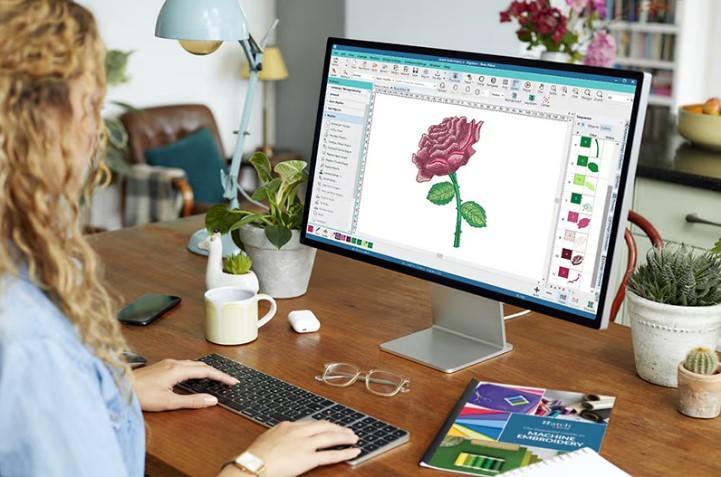
Trace and Define Elements: Use the software's tools to trace the key elements of your logo. Create separate objects for each color section and each type of stitch.
-
Assign Stitch Types: Go through each object and assign the appropriate stitch type based on its size and purpose in the design.
-
Set Stitch Parameters: Adjust the density, direction, and length for each element. Remember to use lighter densities for stretchy fabrics and consider how stitch direction complements each shape.
-
Add Underlay: Apply appropriate underlay to every element that will have satin or fill stitches.
-
Establish Stitch Sequence: Arrange the stitching order to minimize thread changes and jump stitches. Typically, you'll want to stitch all elements of one color before moving to the next.
-
Simulate and Refine: Use your software's simulation feature to watch how the design will stitch out. Look for potential problems with sequencing or density.
Testing and Refinement: The Key to Perfection
Even experienced digitizers never skip the testing phase. Your first conversion will rarely be perfect, and that's normal. The testing process is where you refine your work into something truly professional.
Stitch your converted logo on a scrap piece of the actual fabric you plan to use for your final product. Use the same stabilizer and thread you'll use in production. This test tells you everything you need to know about your conversion.
Examine the test stitch carefully:
-
Look for puckering or distortion
-
Check that all elements align properly
-
Verify that small text remains readable
-
Ensure colors look right next to each other
Use what you learn from the test stitch to go back and adjust your digital file. You might need to increase pull compensation if shapes distorted, adjust density if there's puckering, or change stitch types if details didn't come out clearly.
Conclusion: From Digital Masterpiece to Embroidered Excellence
Converting your logo to a PES embroidery file is a skill that improves with practice and patience. What begins as a technical challenge soon becomes an intuitive process of translation and adaptation. Each logo you convert teaches you something new about how digital designs transform into stitched art.
Remember that even professional digitizers create test stitches and make adjustments. The goal isn't perfection on the first try but developing the skill to recognize what needs improvement and knowing how to fix it.
As you master this art, you'll find yourself looking at logos differently—seeing not just colors and shapes, but potential stitch types and structural considerations. You'll unlock the ability to take any brand identity and render it in thread with confidence and precision. Your logo represents your brand's identity; now you have the power to make that identity shine in the tactile, lasting medium of embroidery.

 English
 Arabic
 French
 Spanish
 Deutsch
 Turkish
 Dutch
Dutch
 Italiano
 Russian
 Romaian
 Portuguese (Brazil)
 Greek
Greek