
What Is Collate in Printing? Simple Explanation
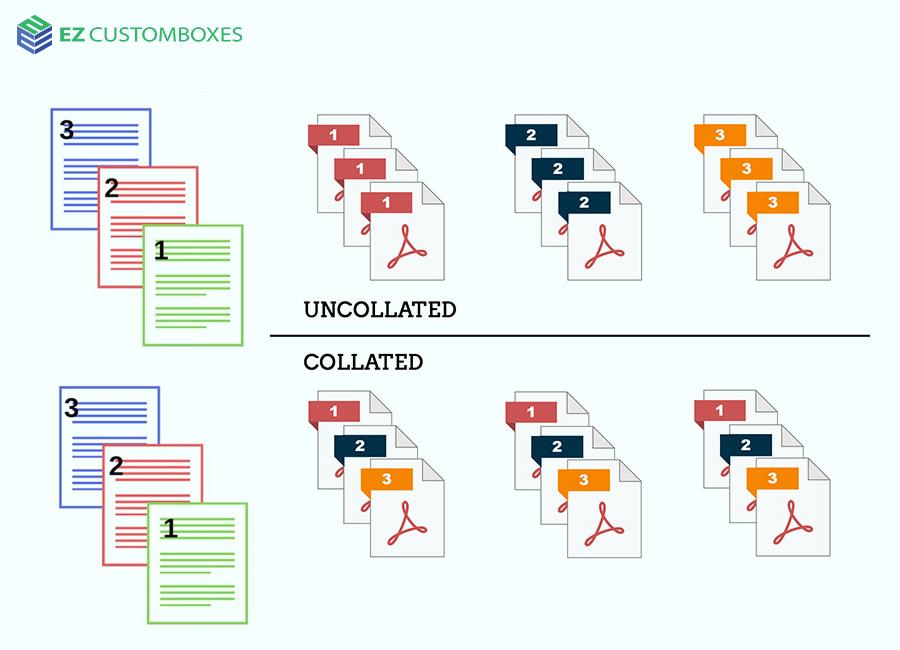
If you’ve ever printed multiple copies of a document, you may have noticed a setting called “collate.” But what is collate in printing, and why does it matter?
In simple terms, collating controls how printed pages are grouped. Turning it on or off can save time, reduce errors, and make documents easier to share. This guide explains collated printing in plain language so you can choose the right option every time.
What Is Collate in Printing?
What does collate mean when printing. Collate in printing means printing pages in complete, ordered sets when printing multiple copies.
When collating is turned on, each copy of your document prints in the correct page order.
Example of Collated Printing
If you print 3 copies of a 3-page document, the output will be:
-
Page 1, Page 2, Page 3
-
Page 1, Page 2, Page 3
-
Page 1, Page 2, Page 3
Each copy is already assembled and ready to use.
What Does Uncollated Printing Mean?
Uncollated printing groups all identical pages together instead of complete sets.
Example of Uncollated Printing
Printing the same document uncollated produces:
-
Page 1, Page 1, Page 1
-
Page 2, Page 2, Page 2
-
Page 3, Page 3, Page 3
This requires manual sorting afterward.
Collated vs Uncollated Printing: Key Differences
| Feature | Collated | Uncollated |
|---|---|---|
| Page order | Complete sets | Grouped by page |
| Best for | Reports, handouts | Bulk sorting |
| Time-saving | Yes | No |
| Manual sorting | Not needed | Required |
When Should You Use Collate Printing?
Use collate printing when:
-
Printing reports or documents for multiple people
-
Stapling or binding pages
-
Printing presentations or booklets
-
You want documents ready immediately
When Uncollated Printing Makes Sense
Uncollated printing works better for:
-
Large-volume printing
-
Documents being assembled later
-
Industrial or office sorting workflows
How to Turn Collate On or Off
The collate meaning printer and software include a collate option.
Steps (General)
-
Open the print dialog
-
Look for “Collate” or “Collated”
-
Check or uncheck the box
-
Print your document
The setting is usually found near the “Copies” option.
Why Collating Matters in Printing
Collating improves:
-
Efficiency – no extra sorting
-
Accuracy – pages stay in order
-
Professional presentation – ready to distribute
Even small print jobs benefit from using the correct collation setting.
FAQ: What Is Collate in Printing?
What does collate mean when printing multiple copies?
It means each copy prints as a complete, ordered set of pages.
Should I turn collate on or off?
Turn it on for documents you’ll hand out. Turn it off if you plan to sort pages later.
Does collating slow down printing?
Slightly, but it saves time overall by eliminating manual sorting.
Is collate the same on all printers?
Yes, though the wording and location of the setting may vary.
Do I need collate for single-page documents?
No. Collating only affects multi-page documents.
Key Takeaway
What does collate mean printing complete, ordered document sets when printing multiple copies.
Using the correct setting saves time and keeps your documents organized.
CTA:
Next time you print, check your collate setting—and avoid unnecessary sorting. Bookmark this guide for quick reference.

 English
 Arabic
 French
 Spanish
 Portuguese
 Turkish
 Dutch
Dutch
 Italiano
 Russian
 Romaian
 Portuguese (Brazil)
 Greek
Greek